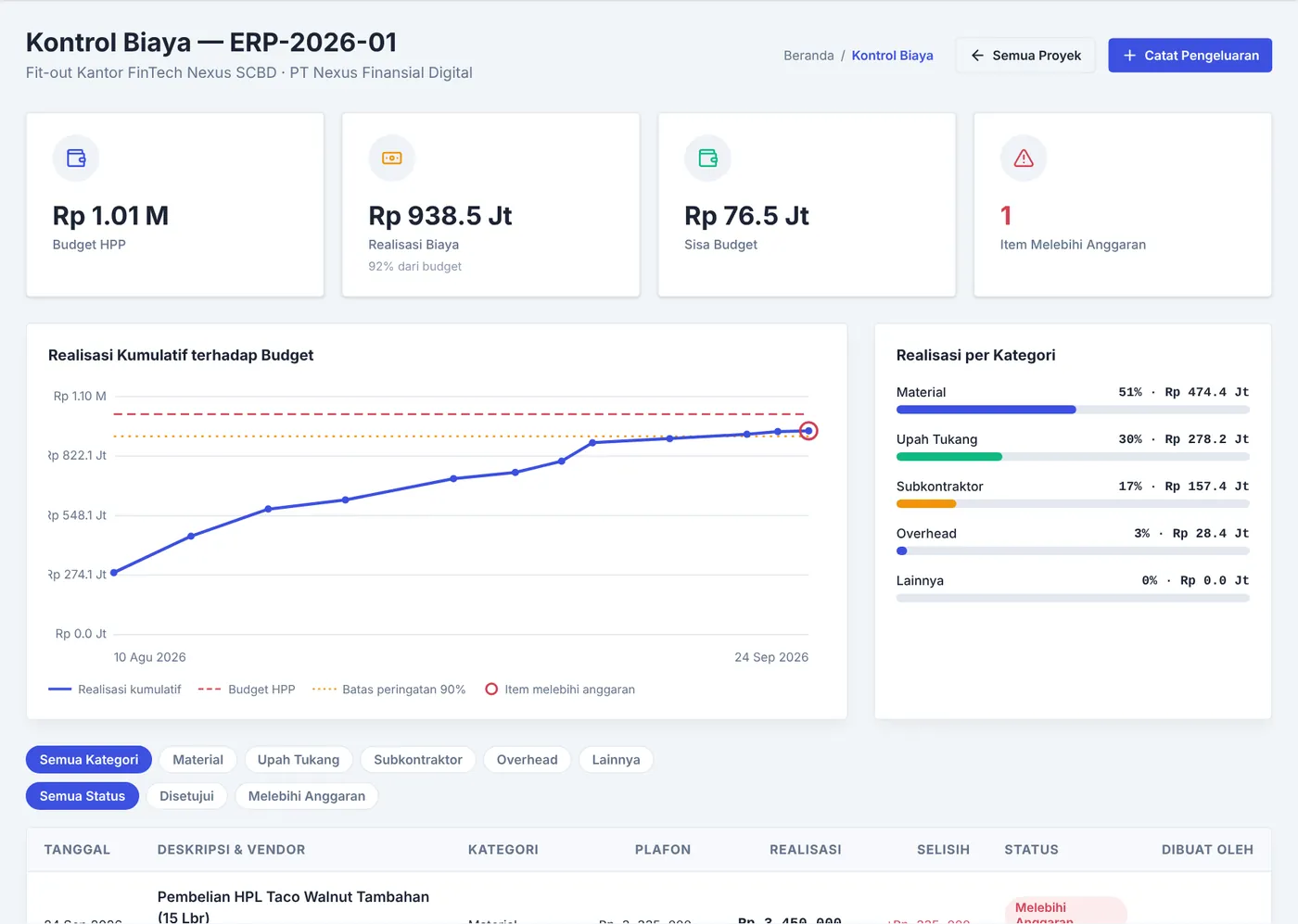
Spot cost overruns before they cost you
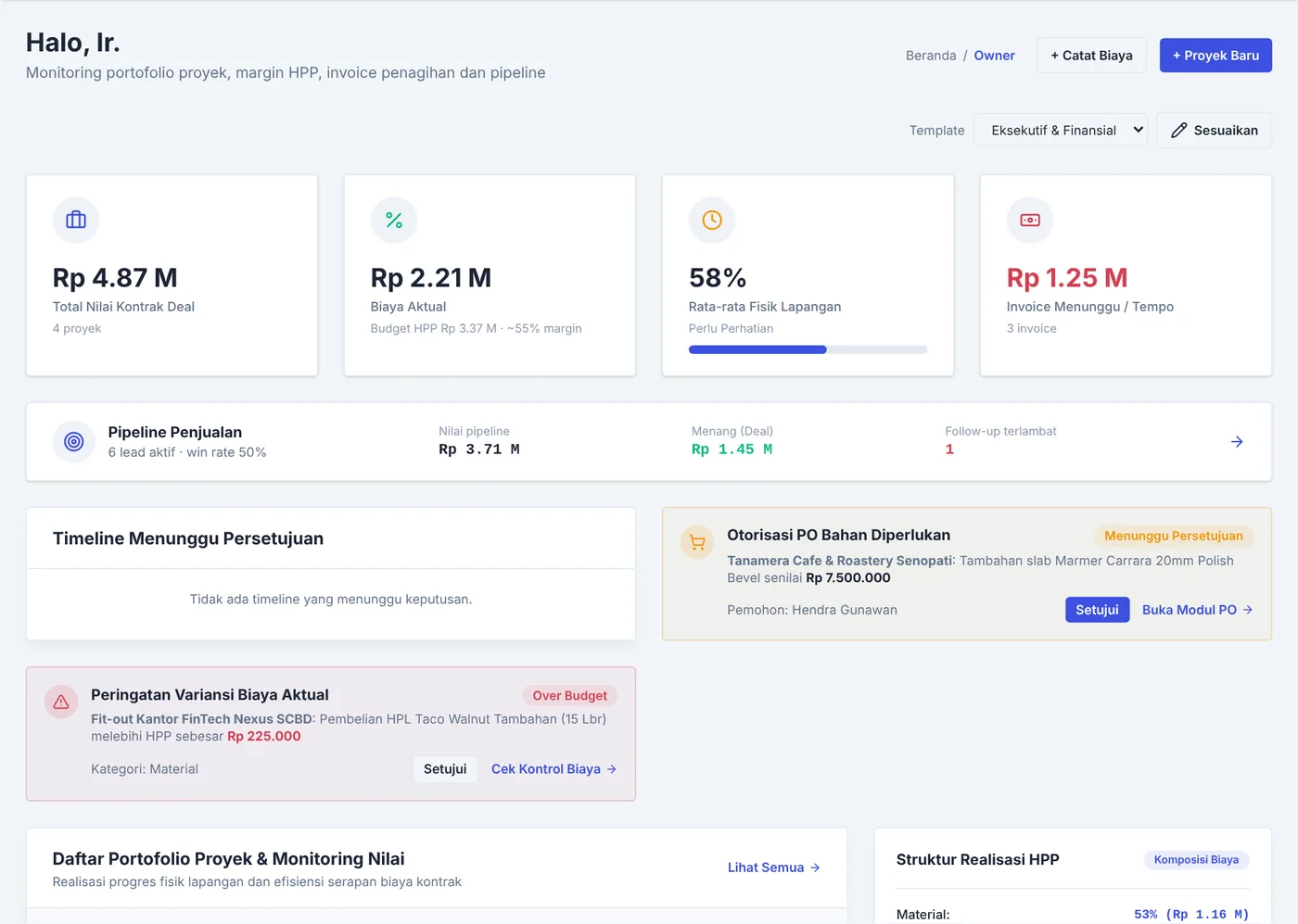
Cumulative cost against the budget, with a 90% warning line. Anything over budget turns red.
project erp / for contractors
A web ERP for contractors: estimates, purchasing, site costs, and invoicing in one place. Run it on your own server and pay once.
Free, no sign-up. Sample data stays in your browser.
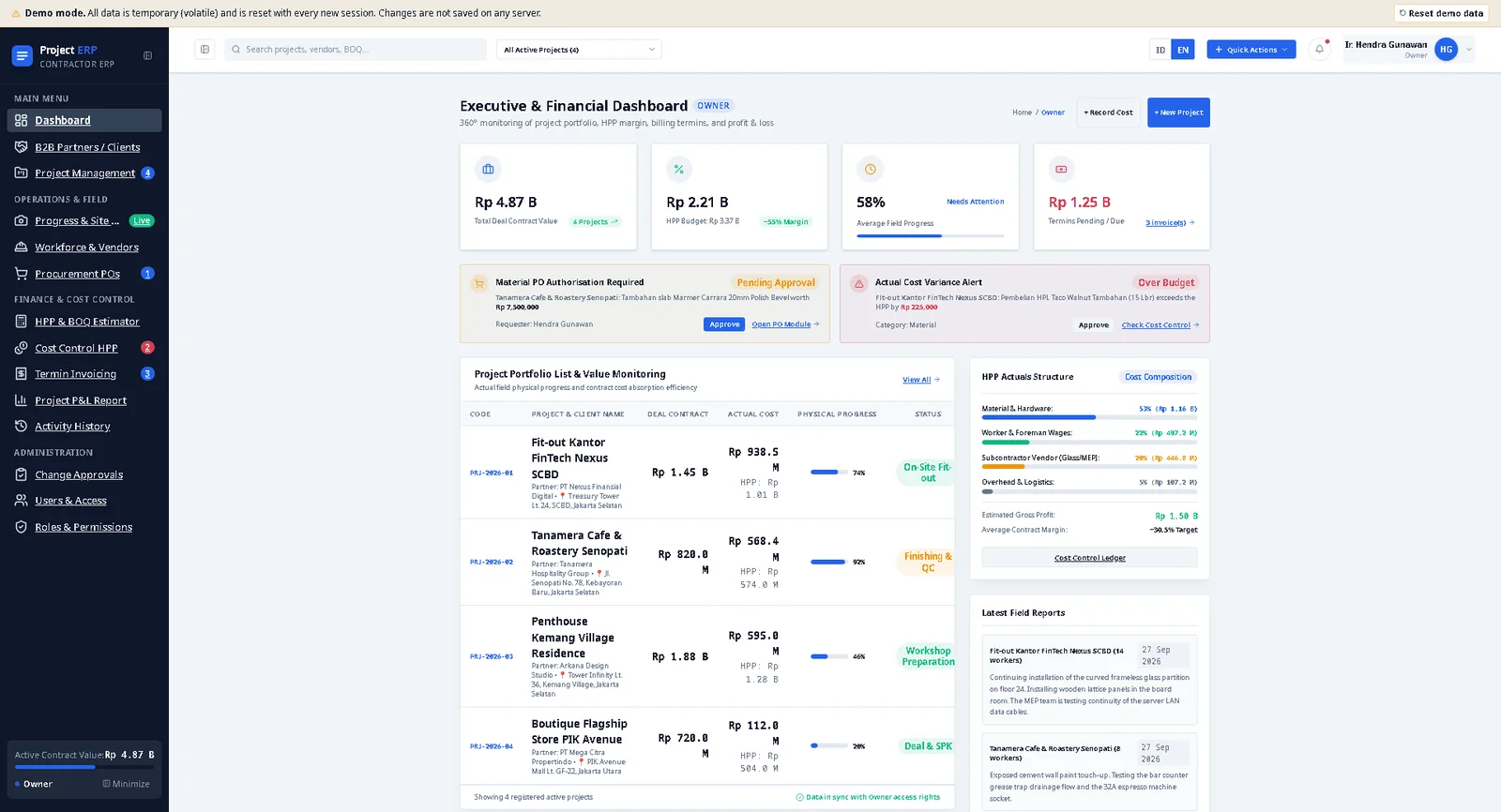
Estimates in a spreadsheet, purchases in a group chat, site costs in a notebook, invoices in another file. By the time it's all put together, the project is already over budget. Project ERP keeps it all in one place, so you spot an overrun while you can still fix it.
A real example from the demo
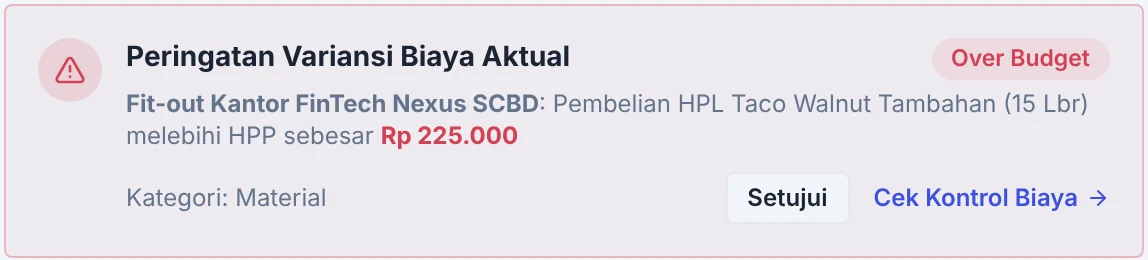
An extra purchase of HPL Taco Walnut (15 sheets) on the Fit-out Kantor FinTech Nexus SCBD project.
A gap this small gets lost among hundreds of spreadsheet rows. In Project ERP, the moment the expense is logged it's flagged Over Budget and shows up on the Owner dashboard, while the project has used 92% of its budget.
A bill of quantities with cost, markup, and selling price per item. You see the margin from the moment you quote.
POs above your limit wait for Owner approval. Actual cost is checked against the budget, and anything over gets flagged.
Stage board, Gantt schedule, work orders for crews and vendors, and daily reports with photos, weather, and headcount.
Invoices for down payment, progress terms, final payment, and retention, with optional VAT. Profit and cash flow per project, ready to print.
Every screenshot is from the demo you can open yourself. Client names and numbers are sample data.
Cumulative cost against the budget, with a 90% warning line. Anything over budget turns red.
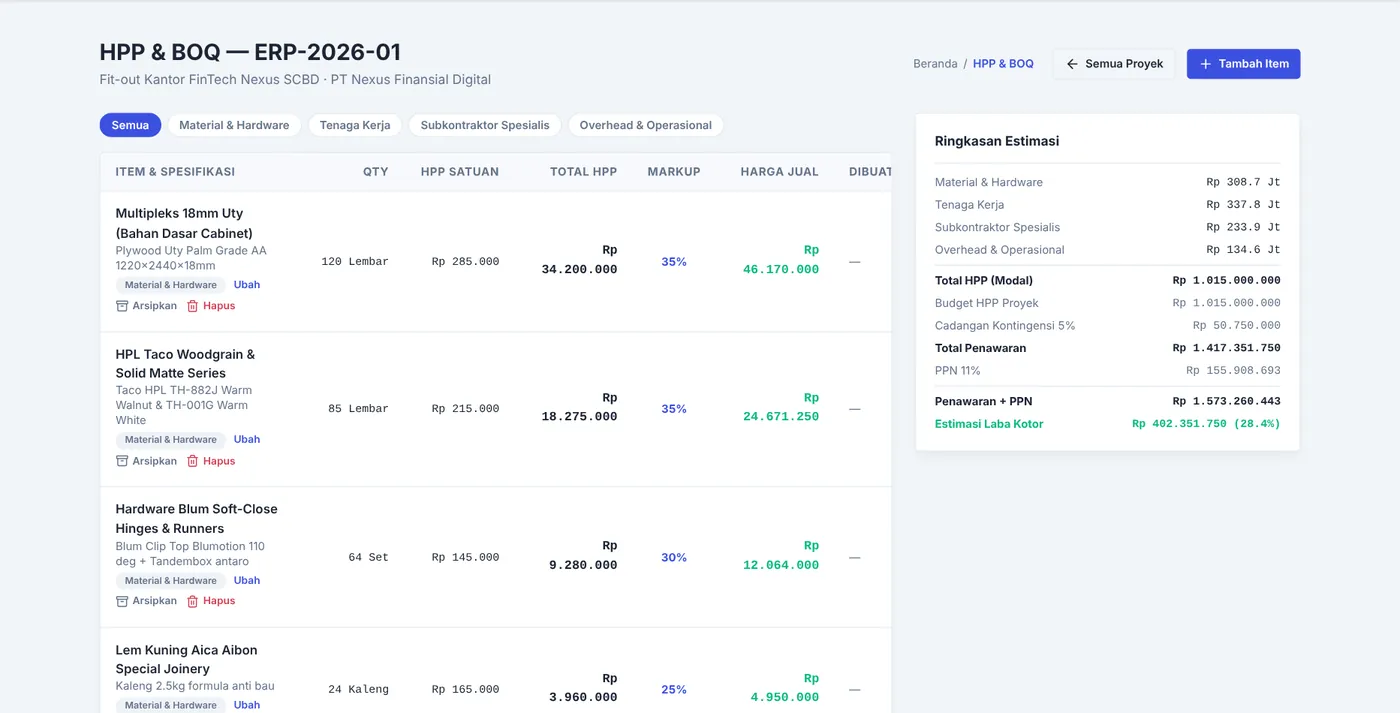
Each BOQ item has a cost, markup, and selling price. The side summary shows total cost, VAT, quote total, and estimated gross profit.
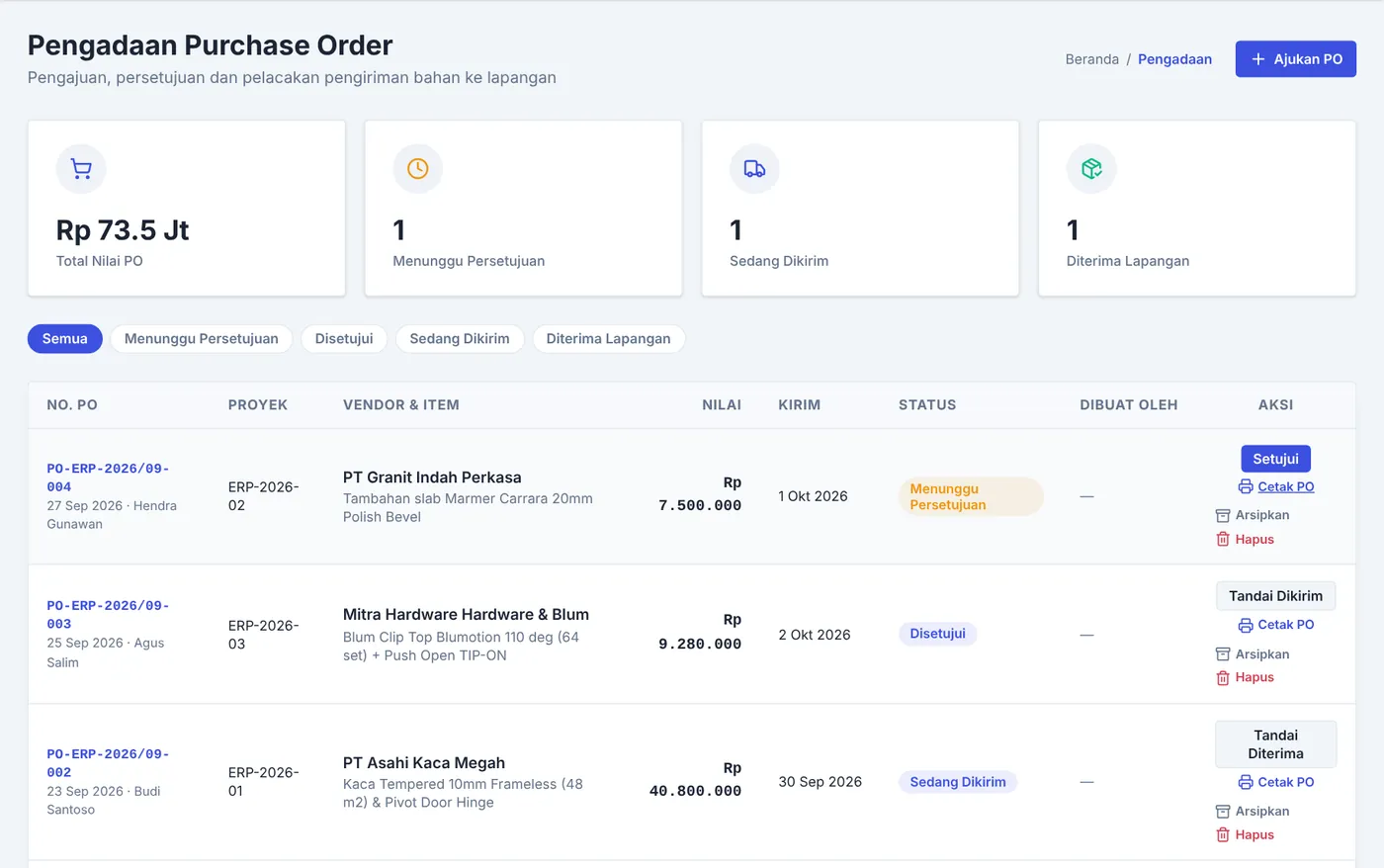
From request to materials received, the status is always visible. Approve and Print PO sit on the same row.
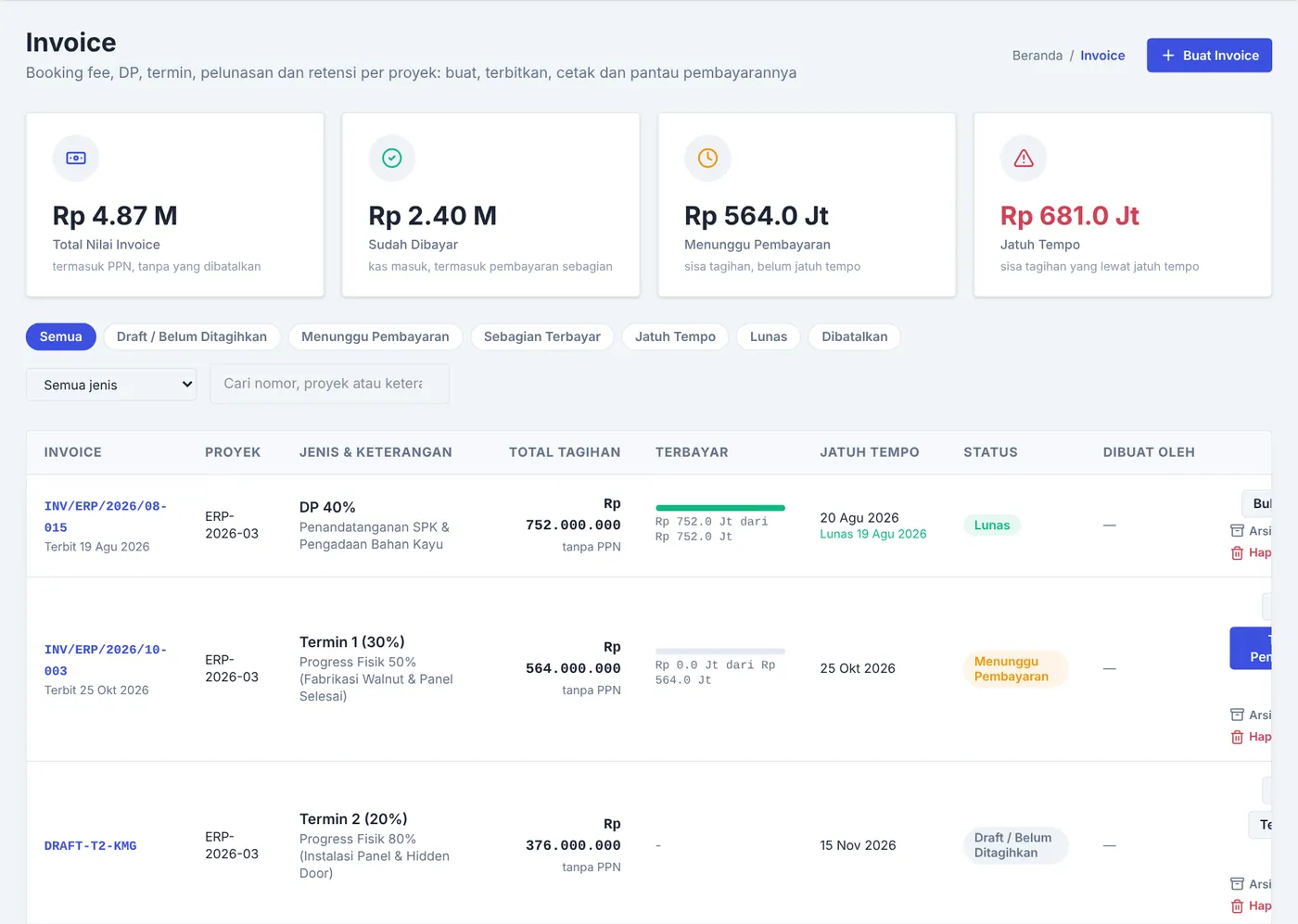
Down payment, terms, and retention for every project. Draft, pending, partial, overdue, or paid, so no invoice gets forgotten.
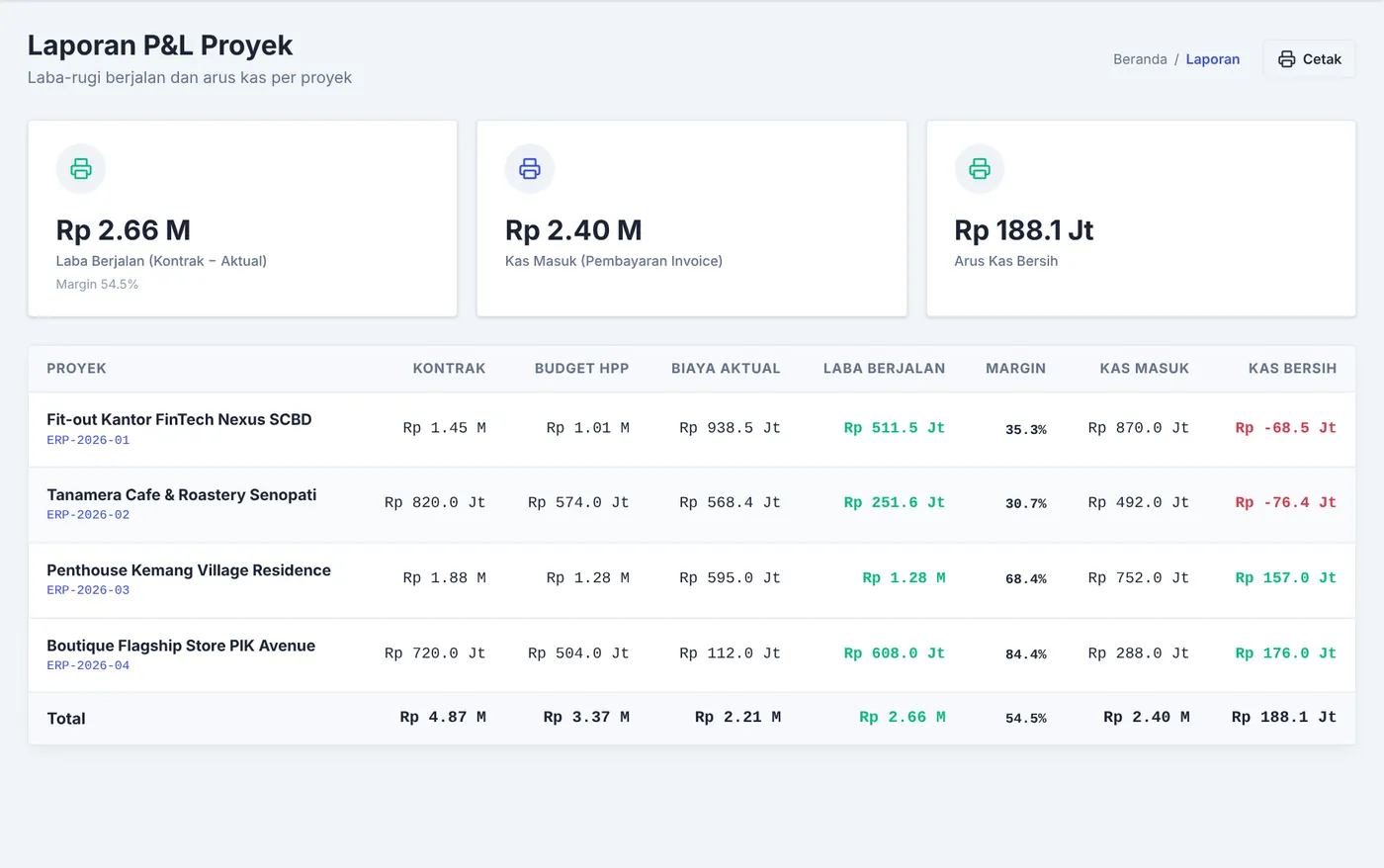
Contract, budget, actual cost, profit, margin, and cash in one printable table.
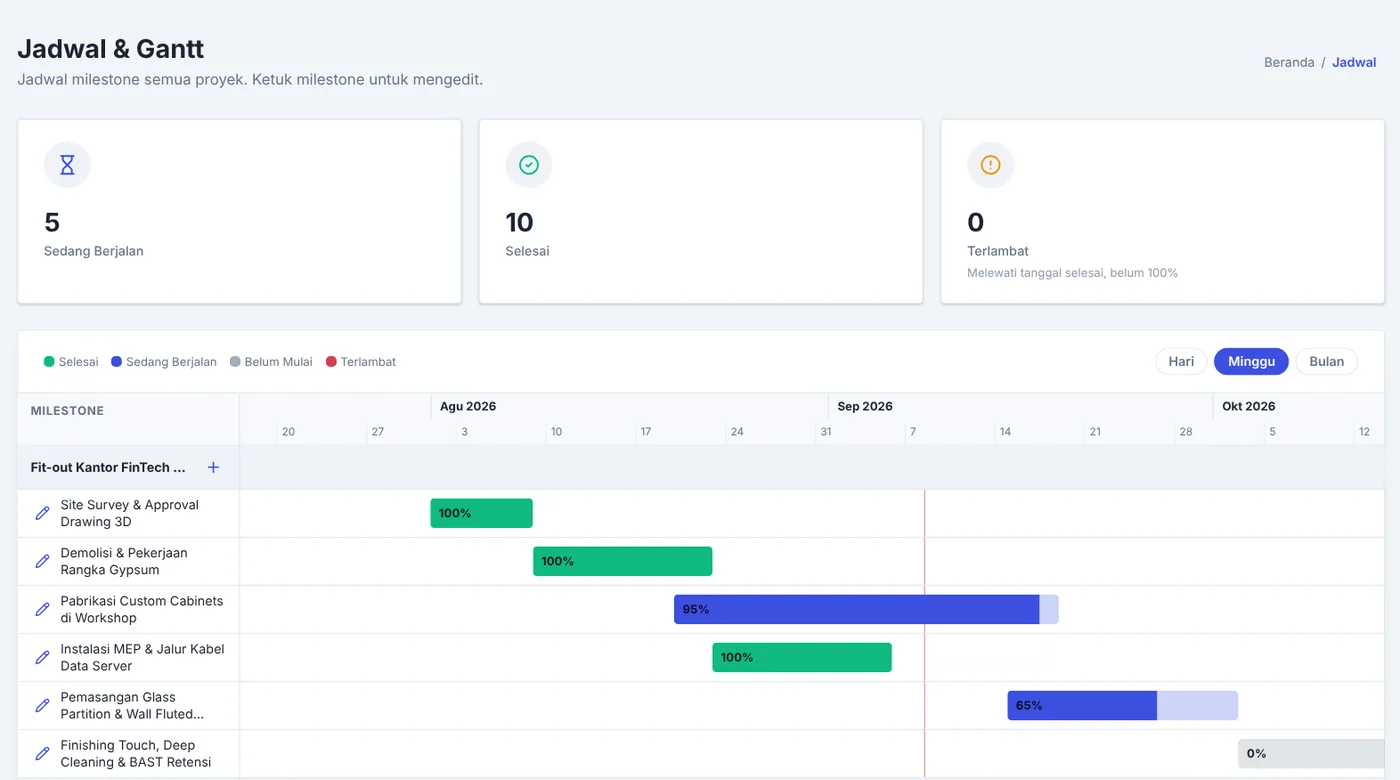
Every project's milestones on one Gantt, with progress on each stage. Tap a milestone to edit it.
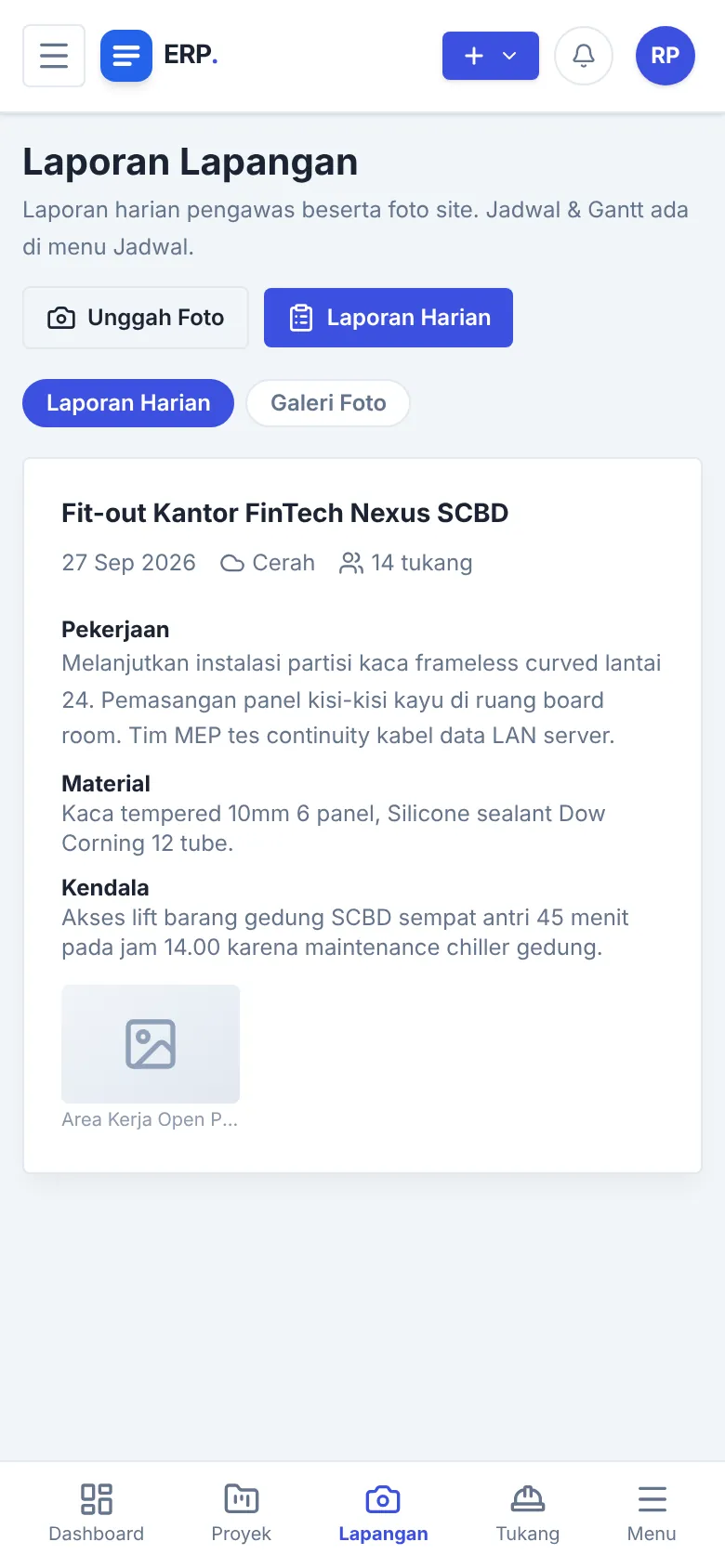
Supervisors fill in the daily report from their phone: weather, headcount, materials, issues.
Leads, negotiation stages, follow-ups, and win rate, until a lead becomes a project.
Cost, markup, selling price, and margin per project.
From request and approval to materials received on site. Printable.
Actual cost against budget per project, flagged when it goes over.
Work orders with Owner approval and staged payments that feed cost control.
Daily supervisor reports: photos, weather, headcount, materials, issues.
Every project's milestones in one view, late ones marked.
Down payment, terms, final, and retention, with paid, partial, or overdue status.
Running profit, margin, cash in, and net cash per project, ready to print.
Seven built-in roles, each with its own dashboard. Permissions are set per feature, roles can be limited to certain projects, and you can add your own.
POs, work orders, quotes, and invoices print with your name, tax ID, address, and bank account. Here are examples, made with a fictional company.
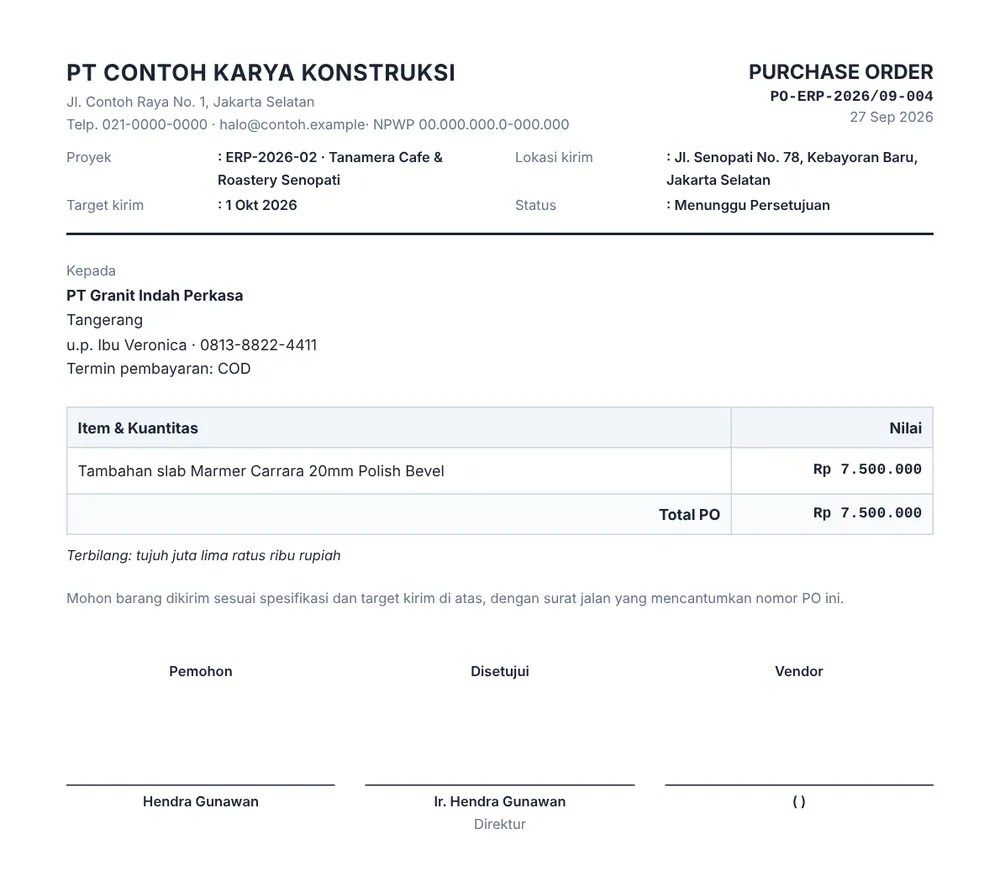
With project, delivery site, vendor, amount, amount in words, and signatures.
Download sample PDF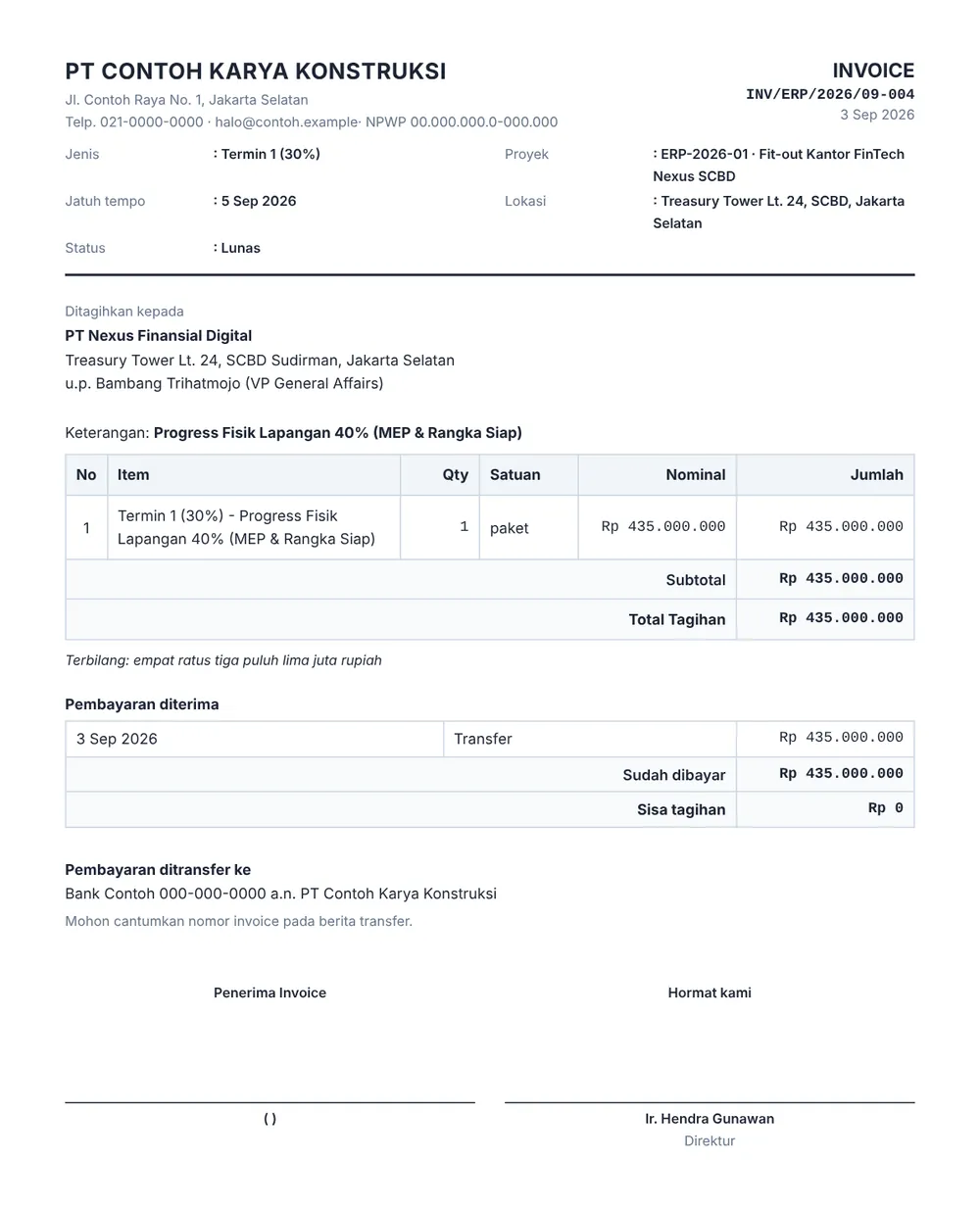
Charges, payments received, balance, transfer account, and signatures.
Download sample PDFAll examples use demo data and a fictional company name.
Edits, archiving, and deletes from the team wait for the Owner.
A trail of every change to projects, costs, POs, invoices, and users.
PO limit before approval, cost warnings, target margin, VAT rate.
Your logo, tax ID, bank account, and quote terms print on quotes, invoices, POs, and work orders.
Deleted data isn't gone right away. Only the Owner can restore it.
| Spreadsheets | Subscription ERP | Project ERP | |
|---|---|---|---|
| Cost | Free, but takes time | Usually billed monthly | One-time, Rp 5,000,000 |
| Users | Shared files, easy to clash | Often priced per user | Unlimited |
| Where data lives | Spread across many files | On the vendor’s servers | On your own server |
| Approvals and history | None | Usually available | Yes, recorded automatically |
| Customisation | Free-form, but manual | Limited by plan | Small changes included, Custom available |
A general picture only. Every product differs, so check before you choose.
Rp 5,000,000
one-time, per company
The full app from the demo, running on your own server.
One license per company. You run the app; source code isn't handed over. Major revisions (v1 to v2 and on) aren't included.
Quoted to fit
priced once the scope is agreed
For contractors whose workflow isn't the standard one.
Read the license and support terms Spelled out before you pay.
The database is PostgreSQL. Pick one setup:
The app and database run together in one Docker Compose setup on your VPS.
The app on your VPS, the database with a provider like Supabase.
A VPS with Docker, a domain, and enough storage. We'll help with the rest.
The demo keeps data in your browser and resets every session. The app you deploy uses PostgreSQL.
The demo account is already filled in, and you can try all seven roles from one screen. It's sample data from an interior project, and nothing is saved.
Contractors who work with estimates, material purchasing, crews, and staged billing: civil, renovation, interior, MEP, and the like. The demo uses an interior project as an example.
You can set roles, cost categories, and financial rules yourself. If your workflow or modules are different, go with Custom.
One license for one company, with unlimited users and projects while your VPS has the storage. You run the app and can ask for small changes. Source code isn't handed over.
A VPS with Docker, a domain, and enough storage. PostgreSQL can run in the same Docker Compose or with a provider like Supabase. We'll help you set it up.
Bug fixes and small changes to the app you bought. Small changes you ask for are released to every user.
Major revisions, like v1 to v2, aren't included in this price and are announced separately.
The app is shaped to your workflow, and we price it once the scope is agreed. Tell us what you need in the form below.
Online checkout, or ask for an invoice and pay by bank transfer. We send the license once payment arrives.
Yes, with the Custom plan. Data migration can be part of the scope.
Yes. It adapts to phone screens, with a bottom bar for the main modules.
Still unsure? Try the demo, or just ask in the form below.